> For the complete documentation index, see [llms.txt](https://docs.dujiaoshou.help/dujiaoshou-scrm-translator/llms.txt). Markdown versions of documentation pages are available by appending `.md` to page URLs; this page is available as [Markdown](https://docs.dujiaoshou.help/dujiaoshou-scrm-translator/app-instructions/installation_instructions/windows-xia-zai-an-zhuang-faqs.md).

# Windows 下载安装FAQs

## **方法一：解决 Windows 已保护你的电脑**

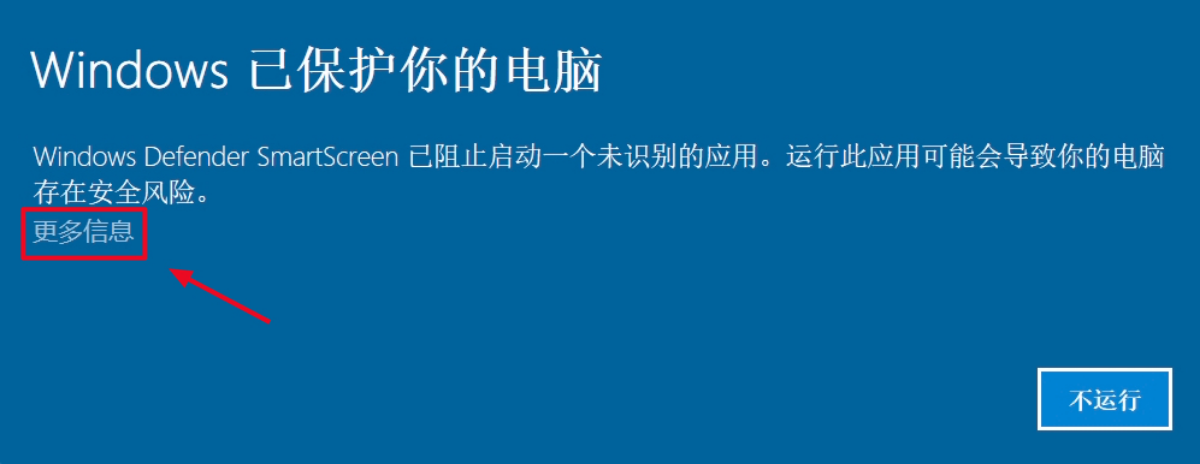
1.点击”更多信息”

<figure><img src="https://www.chatknow.com/assets/images/download/queation_win_img01@2x.webp" alt=""><figcaption><p>如图所示</p></figcaption></figure>

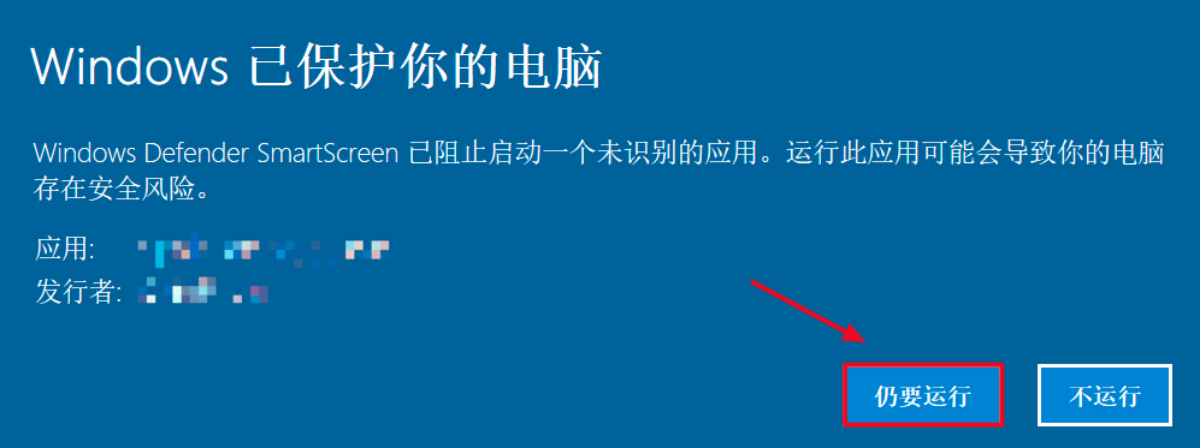
2.点击“仍要运行”，就能正常使用 **独角兽翻译器** 了

<figure><img src="https://www.chatknow.com/assets/images/download/queation_win_img02@2x.webp" alt=""><figcaption><p>如图所示</p></figcaption></figure>

## **方法二：解决 Windows 已保护你的电脑**

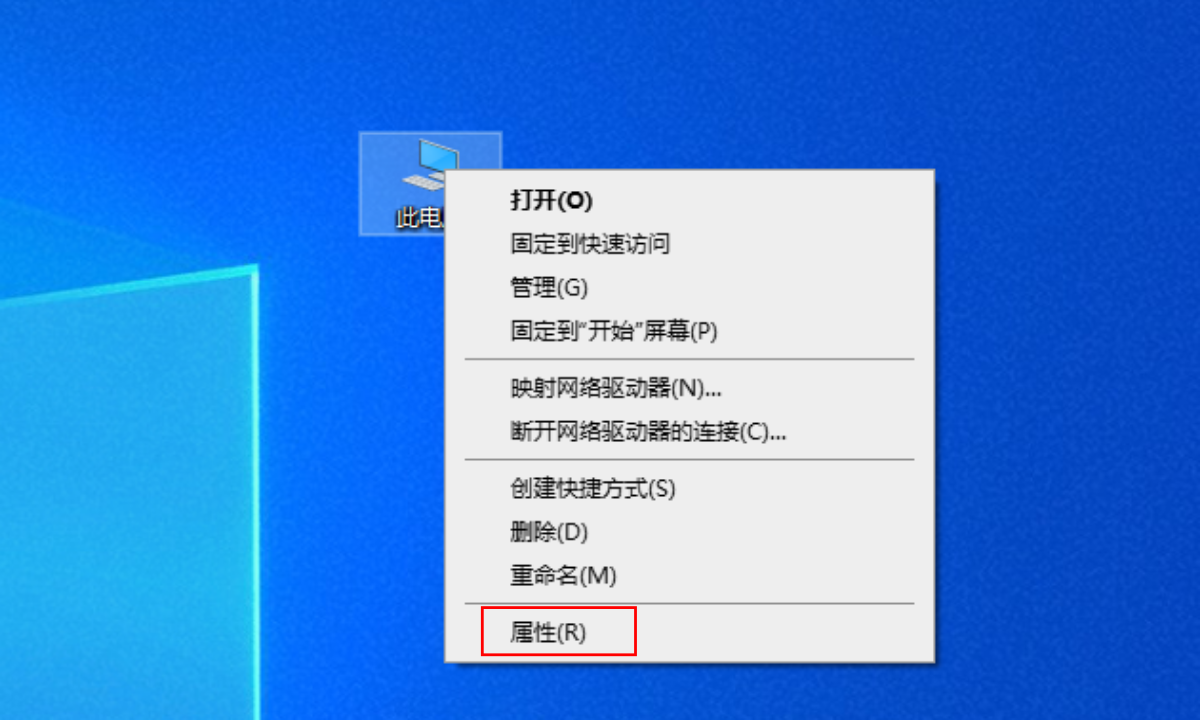
<figure><img src="https://www.chatknow.com/assets/images/download/queation_win_img03@2x.webp" alt=""><figcaption><p>如图所示</p></figcaption></figure>

1\. 右键单击电脑桌面上的“此电脑”图标，点击“属性”，进入 “设置“页面

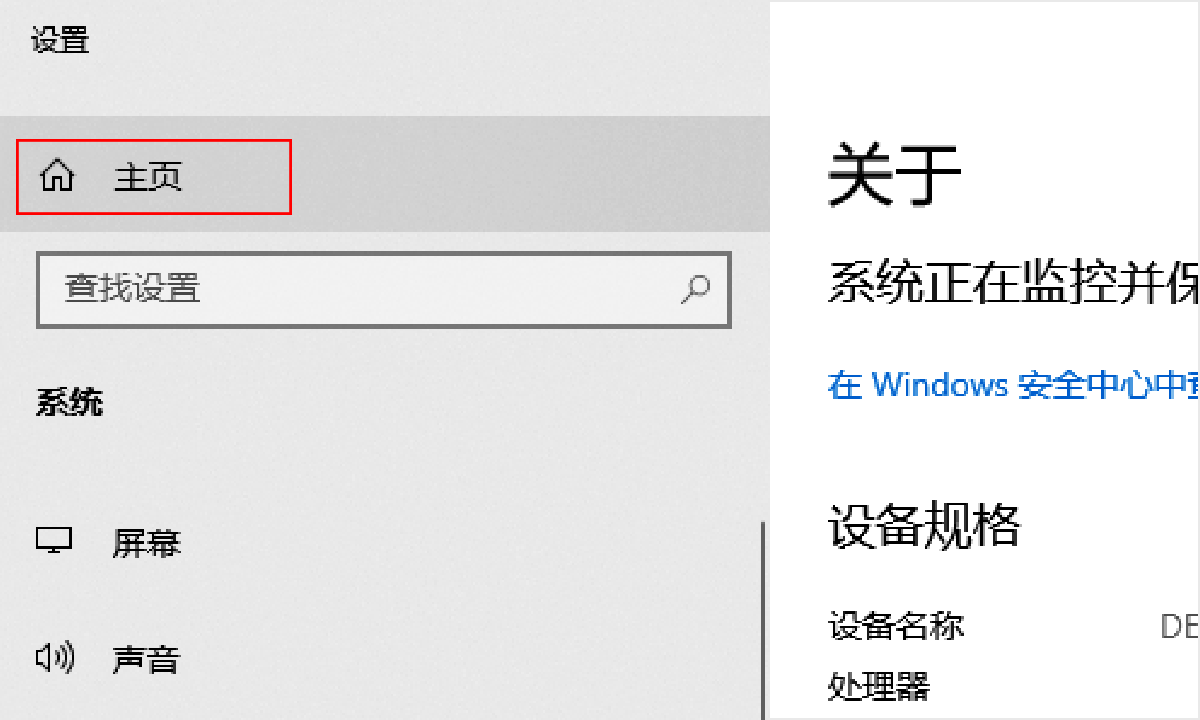
<figure><img src="https://www.chatknow.com/assets/images/download/queation_win_img04@2x.webp" alt=""><figcaption><p>如图所示</p></figcaption></figure>

2\. 点击“主页”进入“Windows设置”页面

<figure><img src="https://www.chatknow.com/assets/images/download/queation_win_img05@2x.webp" alt=""><figcaption><p>如图所示</p></figcaption></figure>

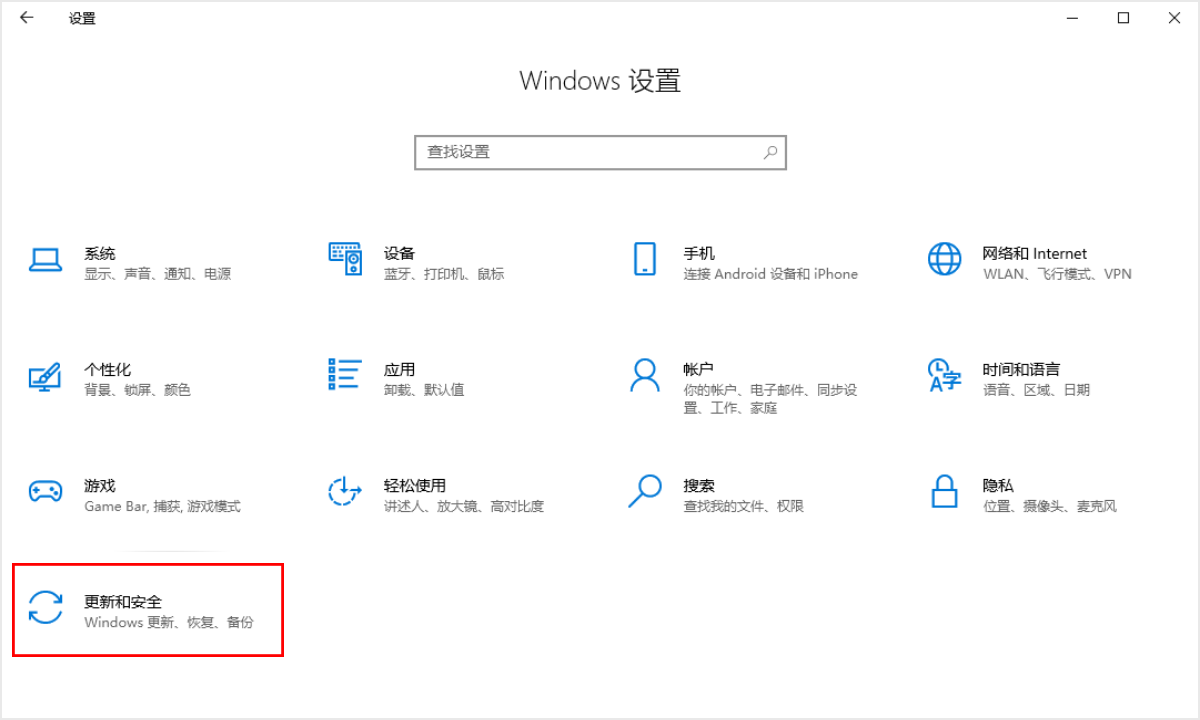
3\. 点击“更新和安全“

<figure><img src="https://www.chatknow.com/assets/images/download/queation_win_img06@2x.webp" alt=""><figcaption><p>如图所示</p></figcaption></figure>

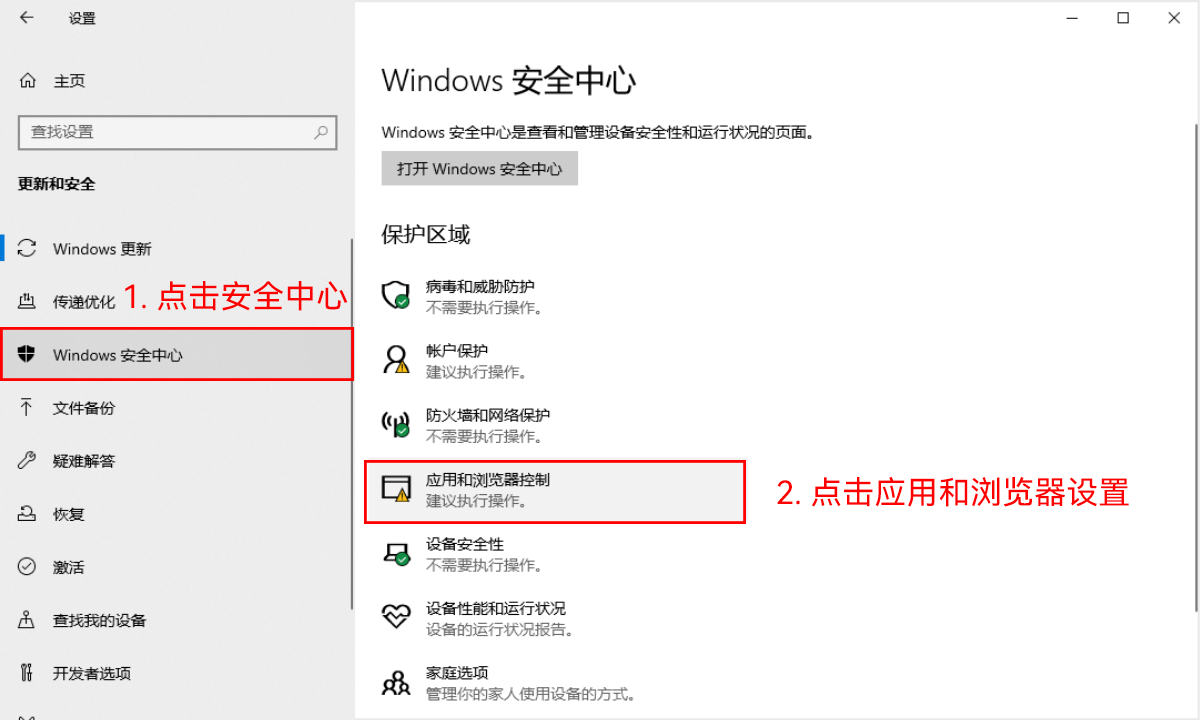
4\. 进入“Windows安全中心“，点击”应用和浏览器控制“

<figure><img src="https://www.chatknow.com/assets/images/download/queation_win_img07@2x.webp" alt=""><figcaption><p>如图所示</p></figcaption></figure>

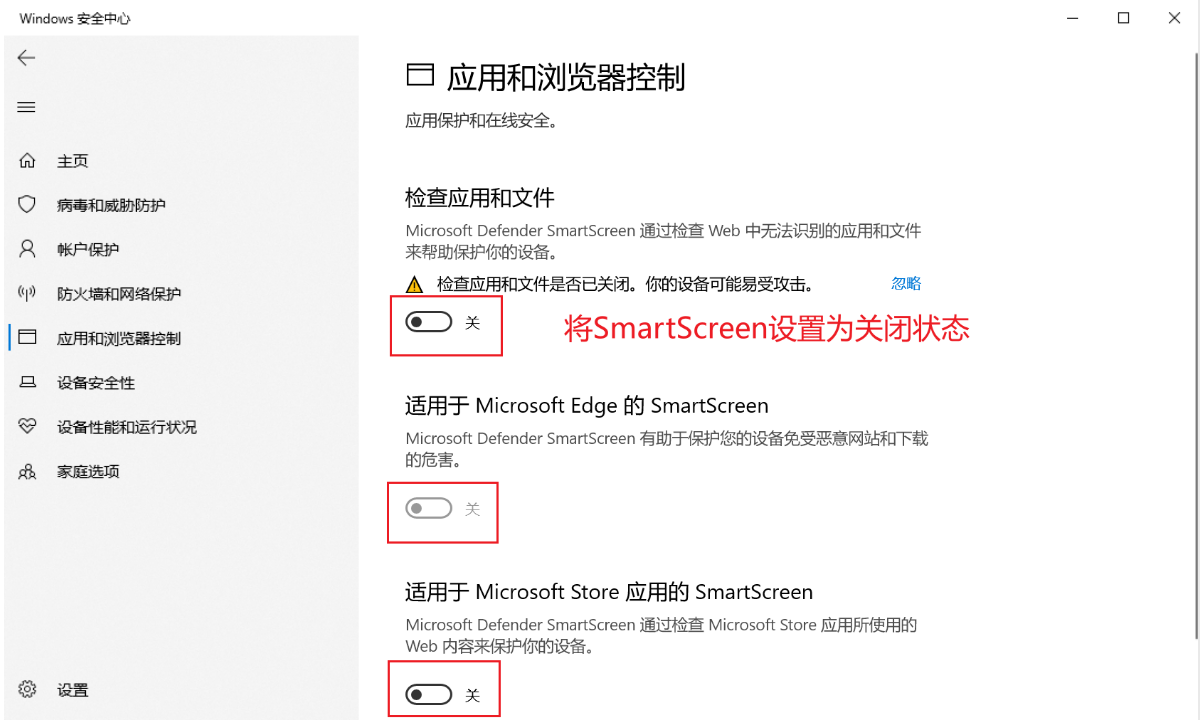
5\. 将3个”SmartScreen“全部设置为关闭状态


---

# Agent Instructions
This documentation is published with GitBook. GitBook is the documentation platform designed so that both humans and AI agents can read, navigate, and reason over technical content effectively. Learn more at gitbook.com.

## Querying This Documentation
If you need additional information that is not directly available in this page, you can query the documentation dynamically by asking a question.

Perform an HTTP GET request on the current page URL with the `ask` query parameter:

```
GET https://docs.dujiaoshou.help/dujiaoshou-scrm-translator/app-instructions/installation_instructions/windows-xia-zai-an-zhuang-faqs.md?ask=<question>
```

The question should be specific, self-contained, and written in natural language.
The response will contain a direct answer to the question and relevant excerpts and sources from the documentation.

Use this mechanism when the answer is not explicitly present in the current page, you need clarification or additional context, or you want to retrieve related documentation sections.